Changelog
Changes in 2026
Oct. 14, 2026
- Missing pages no longer send email alerts. Alerts about server errors are still sent.
- The application for Hospic Čerčany has moved to hospic-cercany.kicoma.eu. All data remains unchanged; you only need to sign in again. Usernames and passwords stay the same.
- Users can change their password from their profile page.
- Try the demo at demo.kicoma.eu with Czech and English sample data.
- New Admin role: has the rights of a stockkeeper, cook and nutrition advisor and can additionally export all data and run data cleanup. Full data import and the administration remain superadmin only.
- The manual describes the Admin role; the former Administrator is now called Superadmin.
- Public demo with sample data and a sign-in for each role; the data is reset every night. The home page shows monthly and yearly prices.
- Self-registration of new users is disabled by default; accounts are created by an administrator.
- Issue and receipt item lists, PDFs, approval and delete pages no longer fail when a document contains a line in a unit that cannot be converted to the stock unit (after an earlier stock-item unit change). The total price is shown as "—".
- Approving such a receipt or issue is refused with a link to the incorrect units report.
- Stock-item unit conversion leaves lines with an unconvertible unit completely unchanged, including their unit price.
- Administrators can repair these lines with the repair_stale_line_units command, which converts both quantity and unit price and keeps the line total.
- The Stock by unit report has a Change unit link next to each stock item for users who may change stock-item units.
- When adding or editing an item on an issue or receipt, selecting a stock item prefills the Unit with the unit the item uses on stock.
- New user functionality
- The Manual has been rewritten as a story from the supplier to the plate: contents, role-based chapters with steps and "Good to know" tips, a When something goes wrong section and a link to the news. The data model and data volume overview include the new menu, menu recipe, unit change and settings tables.
- Unit management supports managed stock-item conversion and conversion of a single recipe ingredient. Stock-item conversion recalculates stock, minimum stock, recipe ingredients and all receipt and issue lines, including approved documents; total stock value and approval metadata remain unchanged.
- A preview shows examples, the factor in both directions, warnings and document rounding differences. The factor source is required, and warnings require confirmation. The latest change can be undone exactly if the related data has not changed since.
- Unit management is accessible from the profile and user menu, stock-item editing, and stock-item and recipe ingredient lists. The incorrect units report offers separate ingredient and stock-item conversion links, including stock-item links on receipt and issue rows. Links and actions respect user roles.
- Receipt and issue forms show the stock unit beside the item name. Stock-item help points to the Change unit button; when a recipe has no other usable unit, authorized users are offered stock-item conversion.
- Goods in pieces have a piece weight in g or ml. Nutrition is entered per 100 g / 100 ml; recipes and daily menus calculate pieces using that weight. Missing piece weights produce incomplete-nutrition indicators and a warning in the goods list.
- Goods with a negative quantity or total value are highlighted in red with a warning icon in the stock list and its PDF.
- Bug fixes
- Receipt and issue approval no longer converts unit prices twice when line and stock units differ (the error could change values by a factor of 1000).
- Unit prices are stored with 4 decimal places and displayed with 2, including the conversion preview table. Cheap goods or goods in g and ml no longer lose their price through whole-crown rounding.
- Issue approval refreshes prices before validating them. Rejected approval leaves the original issue prices and stock unchanged.
- Stock checks aggregate the same item across all lines and use the same rounded quantities as stock deductions, including lines with different units.
- Daily-menu issue generation sums quantities of the same item before rounding. Small contributions from multiple recipes are retained; lines whose combined quantity rounds to zero are omitted.
- Issue totals sum rounded lines and match the stock value change. The monthly receipt and issue report is no longer 1 CZK too low and shows 0 for an empty month.
- Recipe costs preserve ingredient precision and round only displayed totals. Recipes require at least one portion; recipe ingredient and receipt quantities have a minimum of 0.01, matching issues.
- Receipt creation and document approval dates use application-local time. Stock exports accept today's date around midnight and reject future dates.
- Historical exports no longer fail on incompatible units. When stock cannot be determined, the item's quantity and value are left blank; warnings and the export_warning column identify affected documents and lines.
- Data cleanup deletes historical records without failing. Stock cards cannot be deleted while stock or receipt/issue lines exist, preventing loss of historical documents.
- Refreshing a daily-menu issue works in Czech and English and preserves its original author. Corrected the common application configuration.
- Stock-item, recipe ingredient, receipt and issue forms reject stale values after unit conversion. Missing markers cannot bypass the guard, and resubmitting a rejected line cannot save its old quantity or price without re-entry.
- Preview confirmation and exact undo check actual related values, not just modification timestamps. Newer prices, quantities, document metadata and recipe inputs are not overwritten; checks also work after backup restoration.
- Undoing the smallest factor, 0.000001, no longer creates an unreadable audit record. An inverse factor is not prefilled when the source unit or ingredient relationships have since changed.
- Security
- User profiles are visible only to their owners and administrators.
- Goods and recipe names and notes are displayed as text, not HTML, in application messages.
- Full database imports no longer store uploaded dumps in the publicly served media directory.
- Local databases and legacy backup files are excluded from Docker image builds.
- Administration
- Admin editing and import cannot change or delete approved receipts, issues or their lines, or directly change approval flags. Those operations would not recalculate stock.
- Referenced VAT rates cannot be deleted; percentages used on approved receipts cannot be changed through admin editing or import.
- Direct unit changes remain blocked in ordinary stock-item editing, admin and goods-list import. Use managed conversion instead; full backup import still restores units from the file unchanged.
- Unit-change audit records can be viewed, filtered and searched in admin, but not manually added, edited or deleted.
- Superusers can edit stock and nutrition fields without role-group membership. Receipts and issues prevent deletion of their creators and approvers.
- Data cleanup uses document approval dates (the year two years ago and older) and daily-menu dates; unapproved documents are retained. It warns about historical export limitations before the deleted period.
- When creating a new menu, the name is prefilled with the name of the last created menu. Just adjust it, because menu names must be unique.
- Nutrition data and its totals in the daily menu recipe list are now shown only to nutrition advisors.
- Nutrition data in recipe ingredients, the daily menu list and daily menu recipes is shown per serving.
- Total nutrition data in the daily menu list is now shown only to nutrition advisors.
- The daily menu recipe list now shows which menu the recipes were taken from. The menu name is also written into the note of every copied recipe and into the confirmation message, so a menu accidentally picked from another day is spotted immediately.
- FIX: Rows in the daily menu list could be repeated or missing when paging through it if one day and diner group had several meal types.
- FIX: The date filter in the daily menu list now matches the exact date.
- Nutrition data has been simplified to energy, fat and saturated fat, carbohydrates and sugars, fiber, and protein. The compact summary is visible in recipes and daily menus.
- Added the Stock items by unit used report with a unit overview, item counts and total quantities. Selecting a unit shows all goods that use it.
- The maximum energy value for goods has been increased from 3,800 to 10,000 kJ / 100 g.
- The landing page has been redesigned to present nutrition data, the connected kitchen workflow and real application screens.
- The €29 monthly price now clearly states that it includes VAT, security updates, unlimited users and multiple facilities.
- Issuing a stock issue and receiving a stock receipt is now faster, mainly for documents with more goods.
- FIX: When several people issue or receive goods at the same time, the amount and price in stock are no longer overwritten.
- SECURITY: Usernames are no longer displayed to signed-out visitors of the application guide.
- FIX: The incorrect units report now also shows errors in stock issues and receipts. These errors no longer cause an error page in the price report.
- Article nutrition data now includes saturated, monounsaturated and polyunsaturated fat, polyols, starch and salt.
- Nutrition data in article editing and recipe ingredients has a clearer presentation that reflects the fat and carbohydrate hierarchy.
- FIX: Exporting all data now also includes users and groups, so the data can be imported correctly.
- FIX: When creating a stock issue from a daily menu, incompatible units now show a clear error with a link to the incorrect units report instead of an error page.
- FIX: Table columns that cannot be sorted are now correctly set as non-sortable.
- FIX: Saving sometimes failed with an error and the data was not stored when several people used the application at the same time.
- FIX: A nutrition value on an article can now be left empty and saving no longer ends with an error.
- FIX: When you add a recipe that is already in a menu or a daily menu, a clear warning is shown instead of an error page. Just change the number of portions on the recipe that is already there.
- Fix of the text for the Czech and English language versions.
- SECURITY: All application functions are now accessible according to user groups.
- Adds nutritional information to articles and displays it in the recipe. Can be edited by users with the "Nutrition advisor" role.
- The user has the option to view the guide and news in the application from the profile.
- SECURITY: Update to the latest version of Django 6.1 and related libraries.
- When returning to the previous page, the originally displayed section of the page is shown, even if the page is longer.
- SECURITY: Update to the latest version of Django 6.0.2 and related libraries.
- SECURITY: Update to the latest version of Django 6.0.1 and related libraries.
Changes in 2025
Oct. 16, 2025
- FIX: show Message prompting to fix items where the units in the recipe don’t match the units in stock only when needed
- Message prompting to fix items where the units in the recipe don’t match the units in stock. Important to fix before creating an issue slip.
- The data are sorted according to the English alphabet.
- Tables in PDFs use the page space more efectively, so PDFs have less pages.
- Fix of the report 'Recipes with units not matching the stock'. It is now possible to view the recipe and see the problematic items.
- List of daily menus sorted by date.
- Option to add a recipe to daily menus and enter 0 portions.
- Option to enter the date using either the calendar or the keyboard.
- “After creating the daily menu, it is possible to start adding recipes immediately.”
- Complete translation of the application and reports into English. First version, feel free to report possible errors.
- Formatting adjustment of all PDF exports.
- Export of stock status for a selected date.
- Date selection using a calendar.
- Update to the latest version of Django 5.2.6 and related libraries.
- Adjusted sorting of goods in the goods list on the issue slip, the date in the list of issue slips contains only the date and not the time.
- Application speed-up by changing hosting from Heroku to Hetzner and changing DB from PostgreSQL to SQLite.
- Goods receipts have 12% VAT set as default.
- Option to enter the date using a calendar when creating - New issue slip from the daily menu.
- Application extension with Data Maintenance - deletion of inactive records older than 2 years.
- Fix - adding a user via Administration no longer produces an error.
- Update to the latest version of Django 5.2 and update of related libraries.
- Fix for non-functional stock export in Inventory.
Changes in 2024
June 4, 2024
- Faster loading of goods receipts and daily menus. Update of help and About page including translations into English. Logo adjustment.
- Update to the latest version of Django 5.0.6 and update of related libraries.
Changes in 2022
April 14, 2022
- Update to the latest version of Django 4.0.4 and update of related libraries.
- Change of PDF generation from wkhtml to jsPDF.
- Added tests to improve code quality.
- When editing goods on the issue slip, the goods table retains its position and doesn’t jump to the beginning.
- For newly created issue slips: If an issue slip is created and there are 0 units of goods in stock, the 'Unit price with VAT' uses the last stocked price. For this reason, the 'Average unit price with VAT' is shown even when 'In stock' is 0 units.
- Simplified creation of daily menu using a menu that has assigned recipes and portions. How does it work? Create a New menu, add recipes and portions. Then, when creating a daily menu, select the prepared menu and the recipes will be copied automatically.
- Tables display 30 rows by default instead of 15.
- In the recipe list, the Note column was replaced by Allergens, automatically taken from allergens of all recipe items.
- Removed reports Food consumption by recipes per day and Monthly meal cost by diner group.
- Daily menu contains instead of the note field the maximum number of portions from all recipes.
- Issue slip PDF file name format: IssueSlip-%Y.%m.%d_%H-%M-%S-%f.pdf. Symbol description - date formatting.
- Added report Catering unit.
Changes in 2021
Dec. 31, 2021
- Added option to delete a stock card if it is not used in a recipe.
- In the report Goods not used in any recipe direct option to delete goods was added.
- Update to Django 3.2.10.
- New report 'Total cost of receipts/issue slips per month' - permissions also added for reception.
- Update to Django 3.2.9.
- Hosting update to Heroku 20 and removal of multitenant support.
- New report 'Total cost of receipts/issue slips per month'.
Changes in 2020
Dec. 26, 2020
- Update to Django 3.1.4.
- Export and import allowed only for logged-in users.
- Support for multiple companies in the form of separate application instances.
- Safer admin URL.
- Clearer menu with icons.
- Option to switch application language CZ/EN.
- Fix of total price calculation of goods on a line in receipts and issue slips.
- In goods history, note from receipt and issue slip is also displayed.
- Update to Django 3.1.3 and system packages update.
- Clearer display of application change log.
- Simplified password requirements to minimum 8 characters.
- Added report on monthly meal cost by diner group.
- Adjustment of PDF formatting for food consumption report, option for quick view from daily menu.
- Alphabetical sorting of recipes in daily menu.
- When entering goods into a recipe, option to save directly and add another item.
- Software packages updated without affecting functionality.
- User Drábková has rights for Stock list, goods to be stocked, and stock card creation.
- In goods edit header, added total price and stocking/issuing info for receipt and issue slip.
- Enlarged fields when editing goods on receipts/issue slips.
- Hosting update - support for storing up to 10 million records in data.
- Reception has right to create stock cards.
- Kitchen has right to delete issue slips.
- PDF - reduced font size.
- Reception - message after adding goods to receipt includes quantity, unit, and total price.
- Fixed date search in daily menus, receipts, and issue slips.
- Date format validation in PDFs for daily menus and kitchen breakdown reports.
- Import of all data wipes entire DB except users and groups.
- About page - display of total number of records in DB.
- Receipt - fixed rounding of price and goods quantity.
- Receipt - faster input: option to save and move to next item.
- PDF - reduced font size.
- Receipt - fixed total price calculation.
- Receipts - goods sorted by newest entry first.
- Export/import of all data includes everything except users and groups.
- Separated Help, About and Change Log sections. Added link to technical support.
- Price formatting - thousands separated by space and comma instead of dot.
- Inventory - allowed export/import of stock for role warehouseman.
- Daily menu - no duplicate date column.
- Added user in cook role - Mrs. Kohnerová.
- Fix - Issue slip - display all goods not stocked, no partial write-off when not stocked.
- Fix - export includes all application data and import fully resets DB.
- Entering/editing goods on issue slip allows entering 0 quantity.
- Fix - Receipt - goods can be edited.
- Fix - Issue slip - more goods than in stock can be entered.
- Fix - Receipt - goods sorted by entry order.
- Fix - Issue slip - Average unit price of goods stored at issue slip creation according to current stock price, updated after approval, and does not change afterward.
- Moved Overview and Help menus into About menu.
- Option to export and import all application data.
- Fix - Issue slip - total price calculated from average issued price, not stock price.
- Fix - Issue slip - consolidated goods calculated in correct quantity.
- Goods on issue slip can be updated until it is approved.
- Clearer table display.
- In goods history, display receipt/issue slip.
- Fix - Option to export all recipes in daily menu.
- Fix - searching goods in admin works again.
- Issue slip - goods sorted alphabetically in PDF and in list.
- Fixed recipe total price calculation.
- Added display of recipe ingredients from daily menu.
- Fix - Correct price calculation of goods on issue slip.
- Inventory - option to export/import stock for Head Chef role - Dáša, Josef.
- Reception/Kitchen fix - Issue slip creation from daily menu doesn’t check stock, it’s checked only on approval.
- Fix - Recipe from daily menu can now be deleted.
- Fix - Back button on recipe ingredients works.
- Fix - Minimum stock quantity is optional, minimum value 0.
- Kitchen/reception - Goods on issue slip from daily menu appear only once.
- Imported data from Stravníček dated 18.8.2020.
- Only "Nutrition advisor" role has right to create a new stock card.
Program history
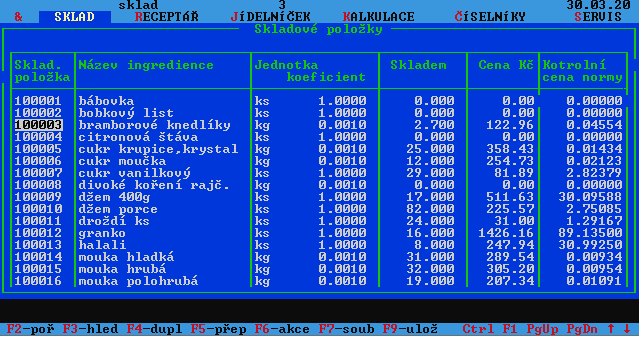
KiCoMa - Kitchen Cooking Management was created as a modern successor, based on the requirements of the company TŘI, z.ú. Current program is inspired by the original Strávníček, which was developed by Josef Dalibába and Dáša Trmalová in 1997-1998.
And a little nostalgic window – this is what the original program looked like: